Your vendor bill says one thing. Your purchase order says another.
Photograph the bill, upload it, and Odoo reads every line and puts it side by side with the purchase order. Price changes, short deliveries and charges you never ordered get flagged before anything is posted.
| Product | PO qty | Bill qty | PO price | Bill price | Diff | Status |
|---|---|---|---|---|---|---|
| Powerade Blood Orange 500ml | 24 | 24 | 1.04 | 1.25 | +0.21 | Price mismatch |
| Bavaria Strong Can 500ml | 48 | 24 | 1.26 | 1.51 | +0.25 | Price mismatch |
| Kristal Water 2L X6 | 320 | — | 2.53 | — | — | Missing |
| Fuze Tea Peach Hibiscus 500ml | 60 | 60 | 0.69 | 0.69 | — | Matched |
| Standard discount | — | 0 | — | 0.00 | — | Extra, not on PO |
Nobody checks a 70-line bill properly.
Not because your team is careless. Because the bill arrives as a photograph, and comparing it by hand takes longer than anyone has.
Lines to compare, by hand
Every quantity, every unit price, every tax line. On one order, from one supplier, on one day.
Bills arrive as pictures
A phone photo of a thermal print. Not a spreadsheet, not an EDI feed, not anything a system can read.
Price creep goes unseen
A supplier lifts a unit price by a few cents. It passes because nobody compared it to what you agreed.
Short deliveries, full price
You ordered 48. You received 24. You were billed for 48, and it was paid.
Found months later
The discrepancy surfaces at reconciliation, long after the credit note was easy to ask for.
Three steps, and only one of them is yours.
Upload the bill
Photograph each page and drop them into the purchase order. Multiple pages are merged into a single document automatically, in the order you set.
OCR and AI extraction
The pages are read, then every line is pulled out as structured data: product, quantity, unit price, tax. You watch the progress and can leave the page while it runs.
Review the comparison
Each extracted line lands next to the matching purchase order line, with its own status. You correct anything the OCR misread and recalculate.
Every line gets a verdict, not a score.
You are not handed a confidence percentage and left to guess. Each line is sorted into one of four states, and the ones that need a human are obvious at a glance.
Nothing to do
Quantity, price and tax all agree with the purchase order. Pass over it.
You were charged more
The unit price on the bill differs from the agreed price, with the exact variance and margin impact shown.
Ordered, never billed
A line on the purchase order that does not appear on the bill. Usually a short delivery worth chasing.
Billed, never ordered
Deposits, delivery fees, discounts and lines that were never on the purchase order at all.
Built for bills that are messy, because they always are.
Multi-page bill scanning
- Upload photos or scans, several pages at once
- Reorder pages before sending them to OCR
- Pages merged into one document against the order
- Everything attached to the purchase order record
AI line reading
- Product description, quantity, unit price and tax per line
- Invoice reference and date pulled from the header
- Runs in the background while you carry on working
- Read quality reported openly, never hidden
Line-by-line matching
- Bill lines matched against purchase order lines
- Price, quantity and tax variance on every row
- Counts for matched, mismatched, missing and extra
- Margin impact shown next to the difference
Your team stays in charge
- Edit any quantity or price the OCR read wrongly
- Recalculate and the whole comparison rebuilds
- Tick only the lines you want carried forward
- No silent overwrites of your purchase order
Price change approvals
- Every price difference becomes an approval request
- Approve or reject line by line, with who and when recorded
- Pending, approved and rejected counts on one screen
- Nothing reaches your accounts unreviewed
Draft bill and audit trail
- Draft vendor bill generated from the agreed lines
- Bill matching, comparison and corrections reachable from the PO
- Full history in the chatter, including what the AI parsed
- Receipts and approvals all linked to the same order
Real screens from inside Odoo, not mockups.
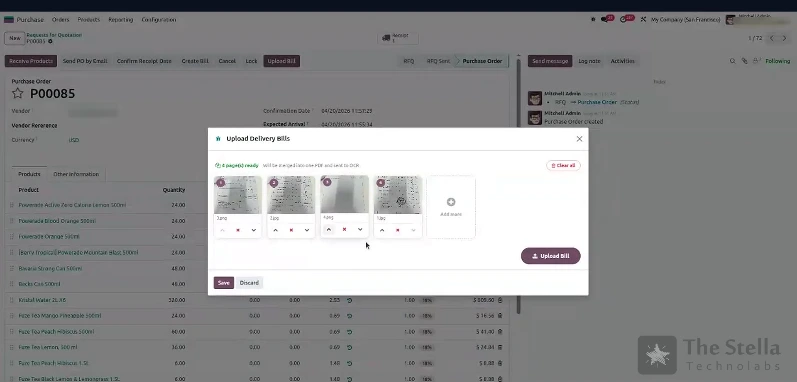
Upload the pages
Four photographed pages, reordered and merged into a single document before scanning.
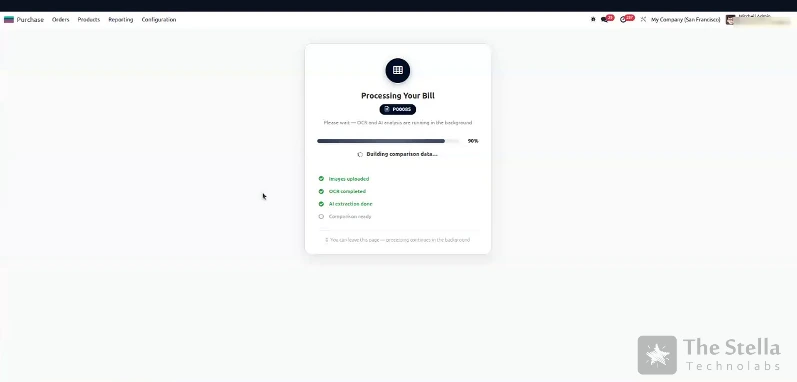
Watch it read
Upload, OCR, extraction, comparison. It keeps running if you navigate away.
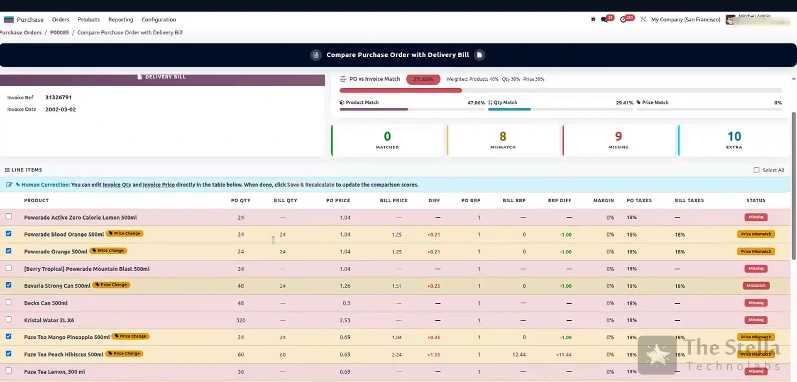
The comparison screen
Counts at the top, every line below it, colour-coded by what is wrong with it.
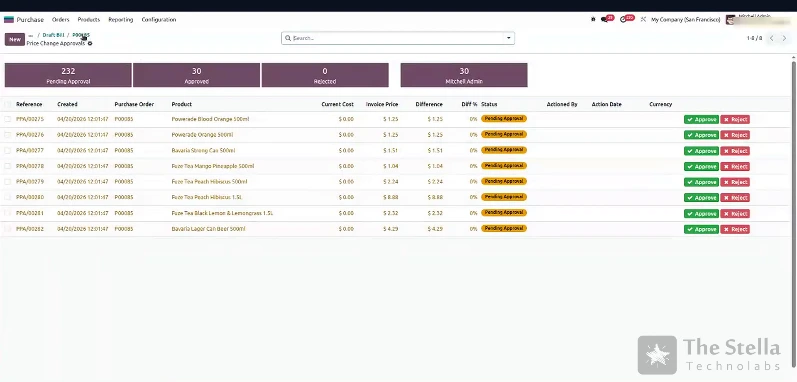
Approve the price changes
Each difference queued for a decision, with current cost against invoice price.
Scanning the bill is the easy part.
Plenty of tools will turn a picture into text. Very few will tell you that line 41 was billed at a price you never agreed to.
| Checking by hand | Generic OCR tools | This module | |
|---|---|---|---|
| Reads a phone photo | Yes, slowly | Yes | Yes |
| Compares against the purchase order | If there is time | No | Every line, automatically |
| Flags prices you never agreed | Rarely caught | No | With exact variance |
| Spots lines billed but not ordered | Rarely caught | No | Yes |
| Corrects a misread line | Not applicable | Re-key it elsewhere | Edit and recalculate in place |
| Approval before it hits accounts | Manual chasing | No | Built in, line by line |
| Lives in your Odoo data | Yes | No, separate app | Yes, on your server |
| Per-page or per-document fees | None | Usually | None |
High line counts, tight margins, paper bills.
Questions, answered.
What if the OCR reads a line wrongly?
It will sometimes, and the module is built on that assumption. A creased photo of a faded thermal print is hard to read. Every extracted quantity and price stays editable in the comparison table. Your team fixes what is wrong, presses recalculate, and the comparison rebuilds against the corrected figures. Read quality is shown openly rather than buried, so you know when a scan is worth redoing.
Does it change my purchase order automatically?
No. Nothing is applied silently. Price differences become approval requests that somebody has to approve or reject, and the draft vendor bill is only created from lines you have agreed. The purchase order itself is never rewritten behind your back.
Does it work with photos, or only clean PDFs?
Photos taken on a phone are the normal case. You can upload several images at once, reorder them, and they are merged into one document before scanning.
What happens to charges that are not on the purchase order?
They are surfaced as extra lines rather than quietly dropped or quietly added. Deposits, delivery charges, promotional discounts and anything else the supplier has put on the bill appears with an Extra status so you can decide what to do with it.
Which Odoo version does it need?
It is built as a standard Odoo module and installs like any other. Tell us the version and edition you are on and we will confirm compatibility before anything is committed.
Does our data leave our server?
The module runs inside your Odoo instance. Where an external AI service is used for extraction we will tell you exactly which one and what is sent, and a fully self-hosted extraction option can be arranged.
Can it be adapted to how our suppliers bill us?
Yes. Bill layouts, tolerance thresholds, who approves what, and which statuses need action are all things we tune per client. That is usually the first conversation.
How do we get started?
Send us a few of your real vendor bills and a purchase order they relate to. We will run them through and show you what it finds on your own documents, before you commit to anything.
Send us your messiest vendor bill.
We will scan it, compare it against the purchase order, and show you what your team would have had to catch by hand. No commitment, no pressure.