The auto shop platform your workshop, counter, and wholesale teams already share.
Seven modular apps on one Odoo install. One customer record, one vehicle history, one inventory ledger - from the intake bay to the parts counter to the delivery route.
Three tools. Three databases. Zero customers in common.
A typical independent shop runs a shop-management system for the workshop, a separate ERP or POS for the parts counter, and a third portal for wholesale accounts. None of them share a customer record. None of them share an inventory. None of them share a vehicle history.
Every time a repeat customer walks in, someone re-types their VIN. Every time a parts counter promises stock, wholesale might have already committed it to a delivery route. Every deferred inspection item vanishes because the workshop tool does not know about the counter's next visit.
Data is re-keyed daily. Owners spend hours reconciling. Customers feel the gaps - and go somewhere else.
One platform. Every part of the business.
Built on Odoo - the open, extensible business platform - the AutoParts suite delivers everything a modern shop needs and nothing it does not. Install only the modules you use. Add the rest as you grow.
Vehicle-first, from day one
Every screen knows the active vehicle. Scan a VIN once and it follows the customer through the workshop, the parts counter, and the wholesale order - for the life of the vehicle.
Modular by design
Seven segment modules snap onto a shared core. Run just the workshop today. Add the counter next quarter. Turn on tire storage when you buy a rack. No rework.
One dashboard, everything
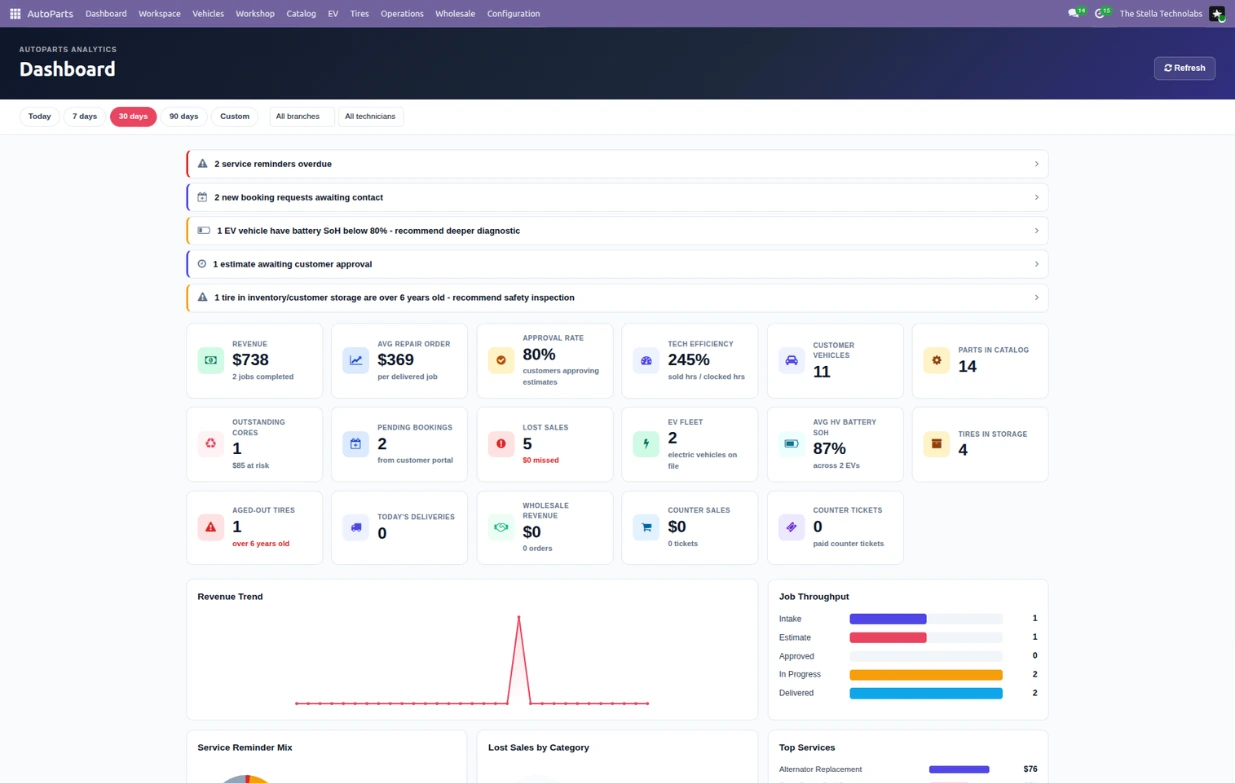
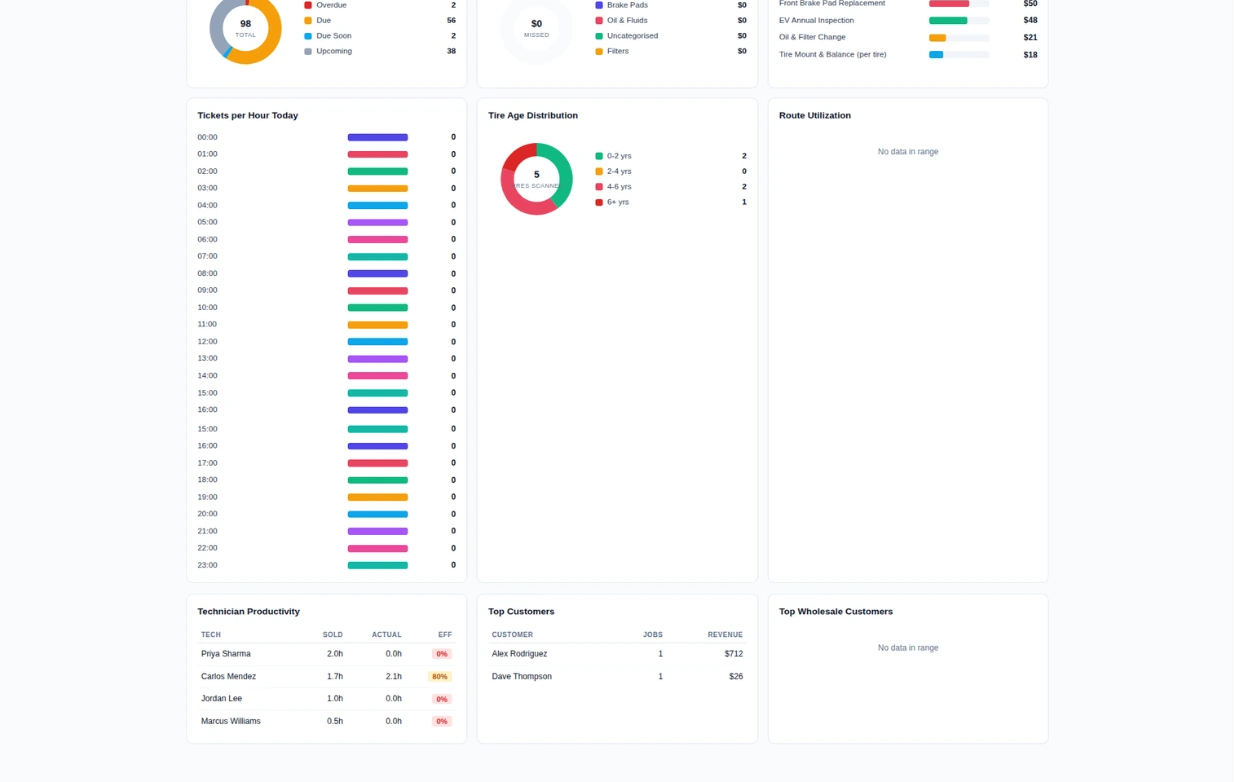
KPIs, alerts, and charts from every module land on a single dashboard. Install more modules and the dashboard grows. Uninstall and cards disappear cleanly. No broken references.
Whether you turn a wrench, run a counter, or manage a route, this suite has your workflow.
Independent Garage
Job cards, technician time clock, digital vehicle inspection, and customer approval by SMS - all built for the way an independent shop actually operates.
Tire & Service Shop
DOT date-code tracking, seasonal storage racks with per-customer bags, and automatic age-out flagging protect your customers and your liability.
Parts Counter Retail
A counter POS extension that scans vehicles, captures lost sales in one tap, and handles core deposits like a proper ledger - not a receipt-line hack.
Wholesale Distributor
Tiered account pricing, per-customer saved order pads, delivery route management with driver proof-of-delivery. B2B done right.
Customer-Facing Portal
Vehicle owners book service online, review past repairs, and approve estimates from their phone. Fewer phone calls, happier customers.
EV Specialist
HV catalog attributes, battery State-of-Health tracking, EV-aware inspection templates, and enforcement of EV-certified technicians on high-voltage work.
A day in the life.
Three steps that cover most of what your shop does every single day.
Scan the VIN. That's it.
A customer rolls in. Your service advisor scans the VIN - or types it - sixty seconds. The free NHTSA decoder auto-fills year, make, model, engine, transmission, drivetrain, and fuel type. Owner, phone, plate. Vehicle saved. On to the bay.
Inspect on tablet. Approve on phone.
Your tech opens the digital inspection on a tablet. Red / Yellow / Green each item with photos. Advisor picks canned labor operations, adds parts. One click sends the customer a token-secured URL. Customer approves each concern individually, signs on their phone, submits. The sale order is created and parts reserved in the same second.
Deliver. Invoice. Then the reminder engine takes over.
Tech finishes the work. Advisor pushes through QC and marks Ready. Customer gets an SMS. They pick up. Invoice generated. The vehicle's service-reminder engine picks up where the repair order left off - computing the next-due date and mileage automatically, and notifying the customer weeks before their next service is due.
Real workflows, no fluff.
Sarah, brake job
Sarah rolls in with a 2022 Camry complaining about grinding brakes. Advisor scans VIN, creates the repair order. Tech Carlos clocks on, walks the DVI on a tablet, marks front pads red at 2mm with a photo, rear pads yellow at 5mm. Advisor sends the estimate by SMS. Sarah opens the link during lunch, approves the front pads, declines the rear pads for now, signs. Repair order advances to Approved. Pads are reserved from stock. Carlos finishes, advisor invoices. The rear pad recommendation stays on the vehicle record and surfaces automatically at Sarah's next visit.
Mike, wholesale route
Mike's Auto Repair (Gold-tier account) calls in the weekly brake parts order for the Honda Accords they service. Counter clerk opens Mike's account, sees "Accord Brake Refresh" - a saved order pad. Clicks Reorder. SO created with Gold-tier pricing applied automatically. Assigned to Route A. Wednesday morning the driver picks it up, drops at Mike's between 9 and 11, snaps a proof photo, gets a signature. Stop marked delivered.
Jenny, EV inspection
Jenny brings her 2023 Model Y for annual service. Because fuel_type is ev, the DVI auto-selects the HV-aware inspection template. Only Jordan (EV-certified) can be assigned as tech - Carlos and Marcus are gated out. Jordan runs the inspection, reads SoH 87% from the BMS scanner, logs it as a reading against the vehicle. Six months later a follow-up reading shows SoH dropped to 79%. Dashboard alerts the shop owner. Jenny gets a proactive call.
Built the way modern software should be.
Tested against standard Odoo Community and Enterprise. No forks, no hacks, no surprises on upgrade.
Every custom screen re-skins for Odoo's dark mode via proper asset bundling - not attribute hacks.
Dashboard uses a registry pattern. Any new module can contribute KPIs, charts, or alerts without touching core.
Customer approvals use token-secured URLs. No password to remember, no account to create. Just approve and go.
models.Constraint, precompute, privilege_id, list view tag - all up to current standards. No legacy cruft.
SMS and email templates for every customer touchpoint. Falls back to a logged URL when the channel is not configured.
Standards-first, from the ground up.
ACES-ready fitment
The fitment table is shaped to match the Auto Care Association's ACES catalog. Bring your own ACES XML feed and import at scale. No re-modeling required.
Free VIN decoding
Vehicle decoding uses the free NHTSA vPIC service - the same public database the industry has trusted for decades. No per-decode fees, no subscription.
Right-to-repair ready
All service data is stored in customer-owned records exportable at any time. Ready for right-to-repair regulatory trends without a data-migration project.
Real accounting
Core charges hit a proper ledger with revenue recognition that survives an audit. Not a POS line-item hack.
Six starter kits based on what you do.
Independent Garage
Single-location shop, 3 to 8 techs, no retail counter. Add EV module if you service hybrids and EVs.
Tire & Service Shop
Tire chains, all-season northern shops, seasonal storage businesses. Add Retail if you have walk-in tire sales.
Parts Counter Only
Small parts shop, used parts yard, standalone counter with no workshop bays.
Full-Service Shop with Counter
Classic full-service auto shop, dealership service and parts combined.
Wholesale Distributor
Regional warehouse-distributor serving many garages. Retail module handles the occasional walk-in.
The Whole Works
Large multi-bay shop with parts counter, EV capability, and delivery routes.
Every metric that matters, in one place - automatically.
The dashboard is where every module lands. Core provides the shell. Each segment module contributes its own KPI cards, charts, top-N lists, and alerts. Install a module and the dashboard grows. Uninstall and its cards vanish cleanly. Filter everything by date range, branch, or technician.
Everything you were about to ask.
Does this work with Odoo Community or Enterprise?
Do I have to install every module?
Can I add a segment module a year from now without disruption?
What happens to my data if I uninstall a segment module?
Does the VIN decoder work for non-US vehicles?
Do I need a subscription to any external service?
Is customer data secure in the approval portal?
Does the workshop portal support mobile?
What if my mechanics prefer a paper checklist over a tablet DVI?
Can I customize the digital inspection templates?
Ready to unify your shop?
Book a walkthrough. See the workshop, counter, wholesale, and customer portal all working on one customer record.