Your ERP, meet your AI.
Let Claude, ChatGPT and Cursor work inside Odoo through one secure endpoint. Curated business tools, a schema the AI actually understands, and human approval on every change.
Useful only if you can trust it
AI assistants are good at answering questions and drafting work, but only if they can see your data, and only if you can trust what they do with it.
This module adds a Model Context Protocol endpoint to Odoo. Your AI client connects with a key tied to a real Odoo user, sees only what that user may see, and works with business actions it understands. Every change it proposes waits as a plain language preview until a person approves it in Odoo. The AI lives in your own client; the module never stores anyone's AI keys.
Safe to trust in production
Safe to trust in production
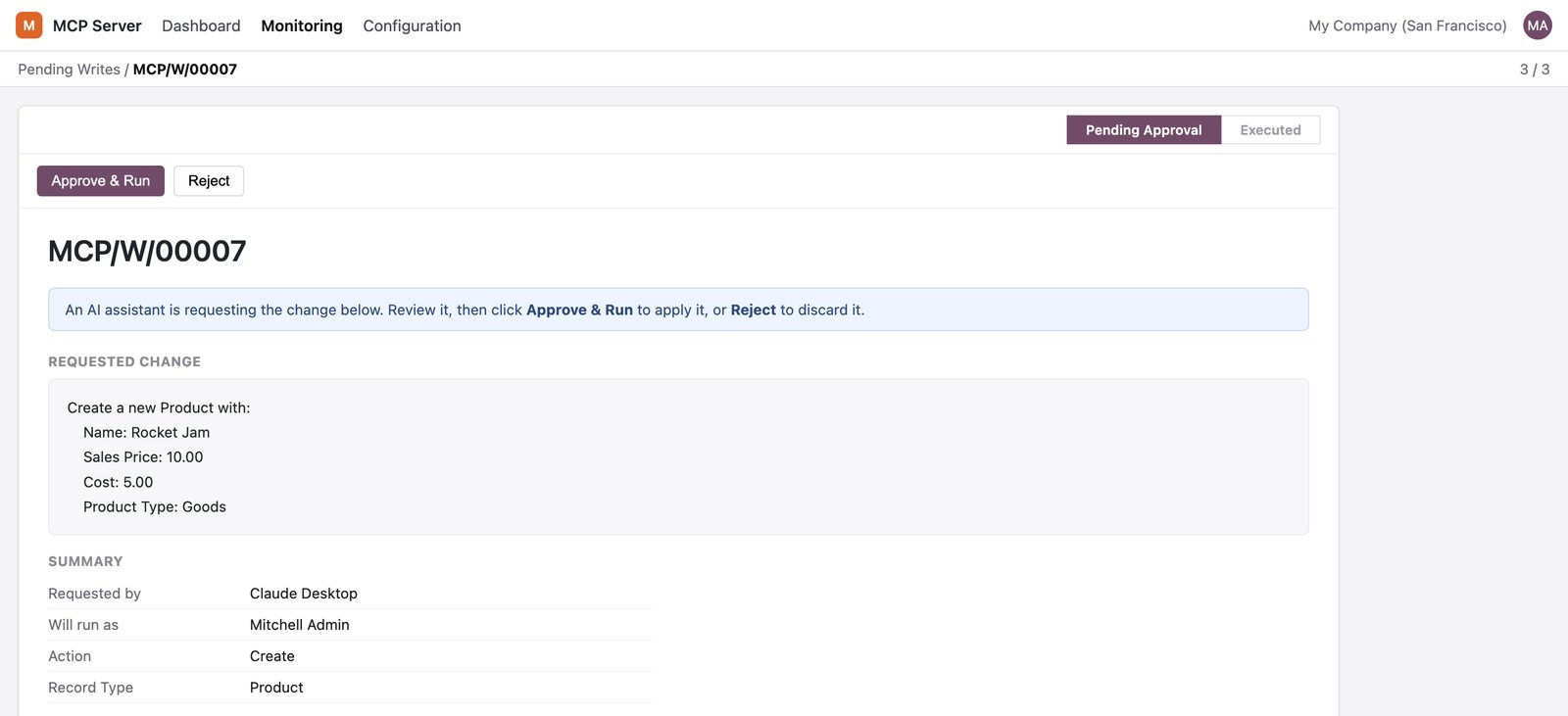
Every create, update, delete or method call becomes a preview that a person approves. Nothing destructive happens behind your back.
The AI stops guessing
It sees field labels, help text, choices and relationships instead of raw technical names, so it stops inventing fields that do not exist.
Provider neutral
Use Claude, ChatGPT, Cursor or any MCP client. No AI is bundled, so there is no lock in and no AI bill from us.
Everything the module does
Each item below is a capability of the published module.
Curated business tools
Named actions like confirm a sales order, draft a vendor bill, register a payment or run aged receivables, beside the generic tools. The AI speaks business, not database.
Semantic schema
The AI sees ranked fields with labels, help text, selection values and relations, so it uses your data the way your team does.
Preview and approve
Every change becomes a plain language preview that a person approves in Odoo before it runs.
Keys and quotas
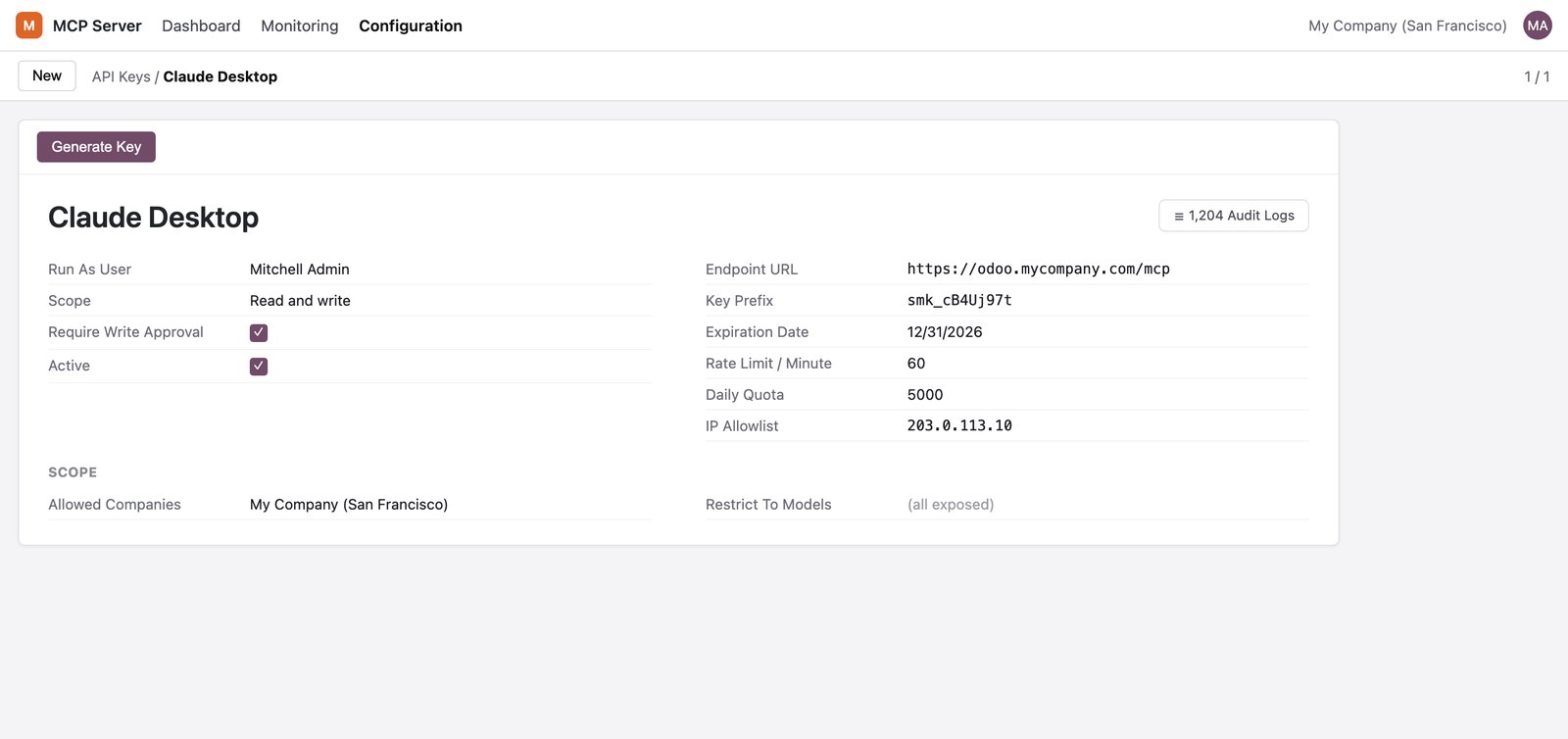
Hashed API keys tied to a user, with read or write scope, per minute rate limits, daily quotas, expiry dates and IP allowlists. The full key is shown only once.
Choose what is exposed
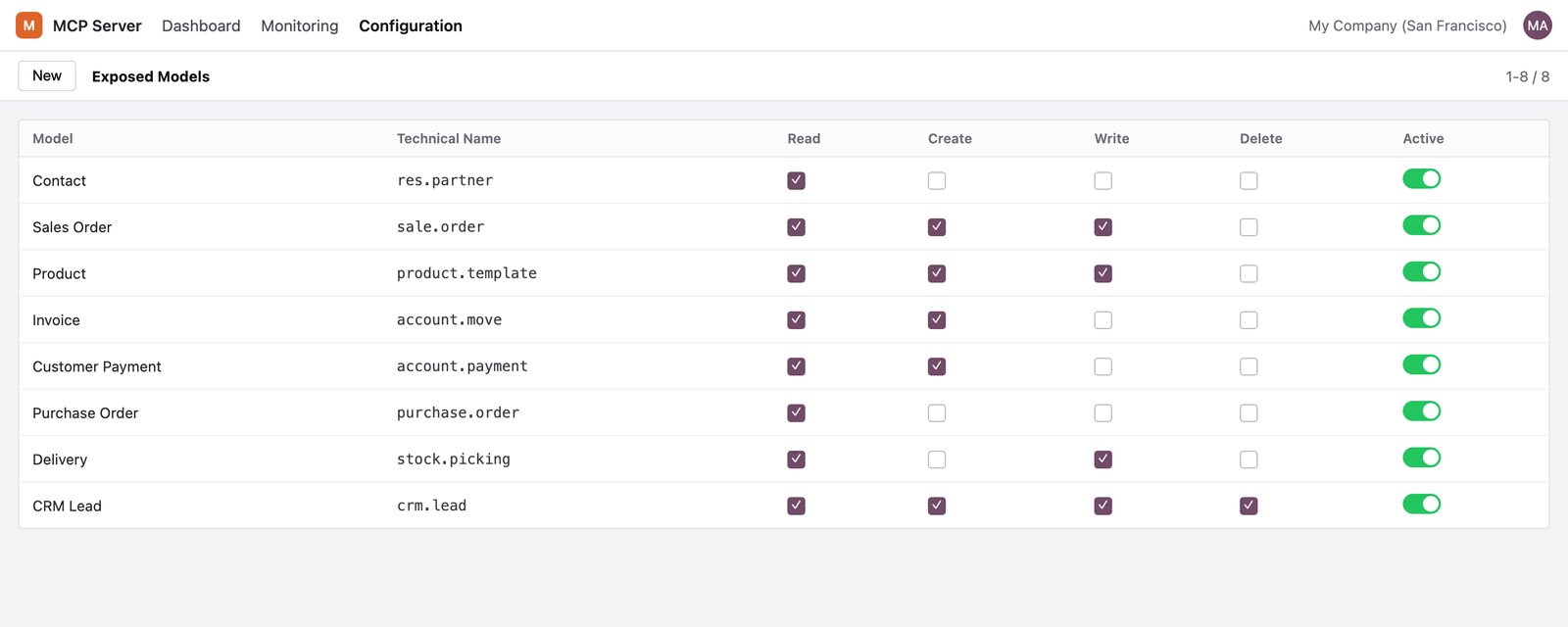
Pick exactly which models and operations the AI may use. Nothing is exposed until you allow it.
Real permissions
The AI acts as a real Odoo user. Record rules, access rights and multi company scoping are enforced, never bypassed.
Immutable audit trail
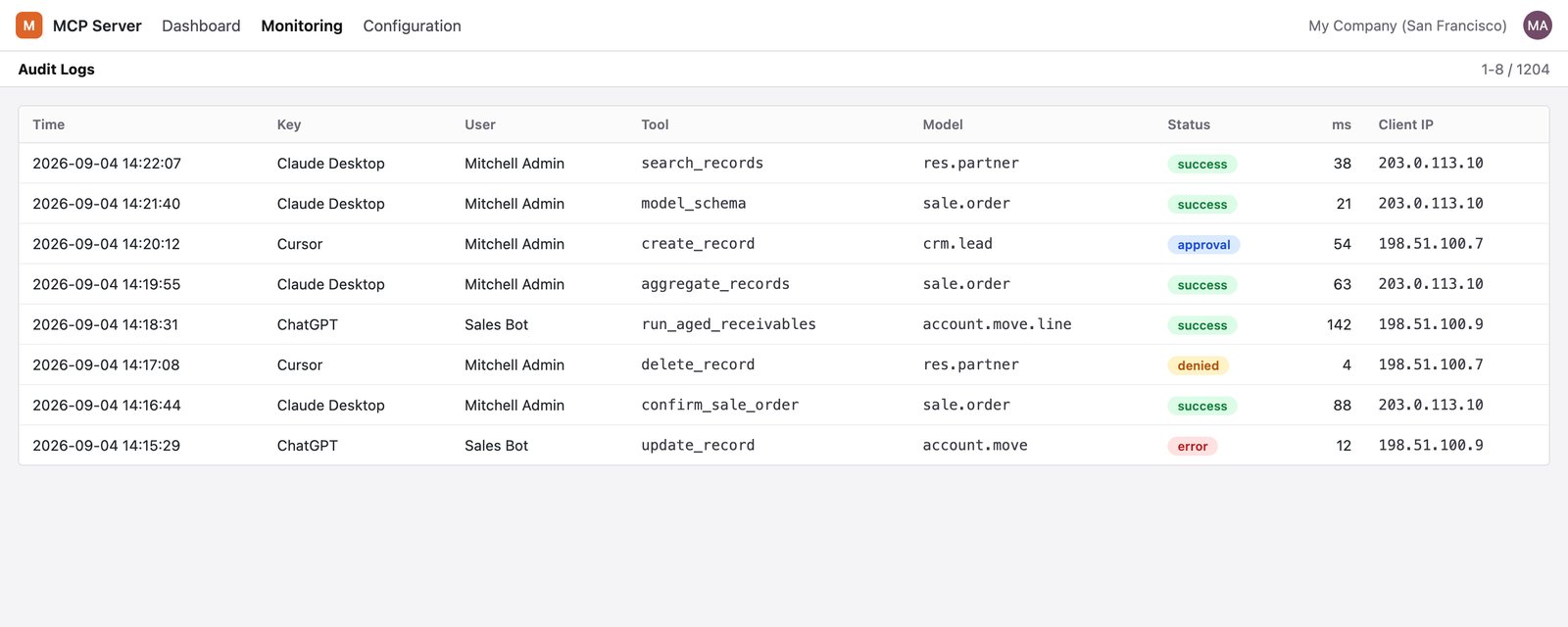
Every tool call is logged with the key, the user, the model, the status, the duration and the client IP. Log entries cannot be edited or deleted from the interface.
Guided prompts
Ready made prompts for a month end close review, a collections run and a stock reorder review give the AI a proven starting point.
Dashboard and connection test
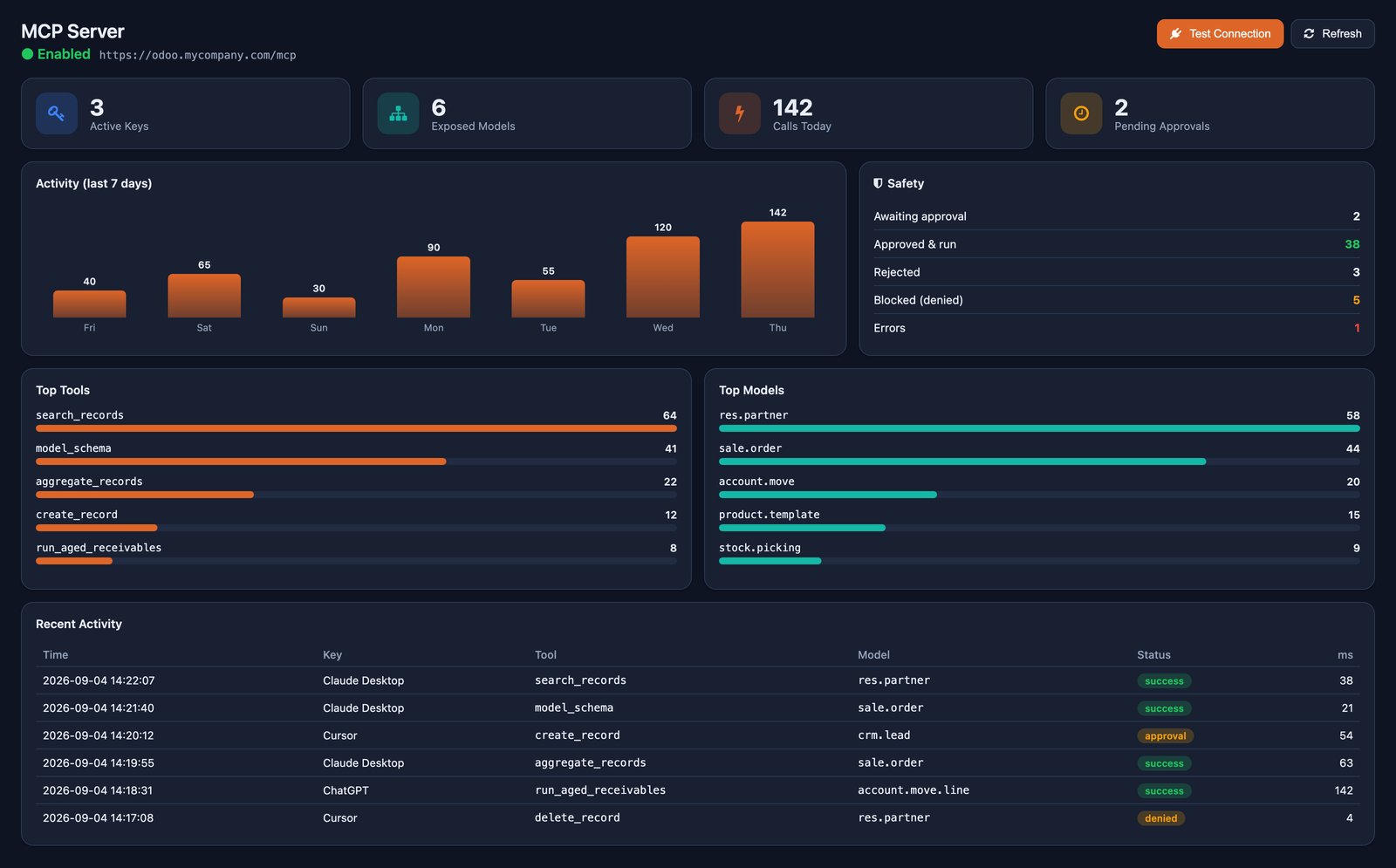
Status, activity and the safety picture at a glance, a getting started checklist, and a one click test that confirms the endpoint is ready.
The tools
Business tools
- Confirm Sale Order
- Create Draft Vendor Bill
- Register Customer Payment
- Run Aged Receivables
- Reorder Low Stock
Generic tools
- Search Records
- Get Record
- Aggregate Records
- List Models
- Model Schema
- Create Record
- Update Record
- Delete Record
- Post Message
- Print Report
- Call Method
Tools that change data always go through the approval step. Business tools work on the apps you already run, such as Sales, Invoicing and Inventory.
Connected in four steps
From install to your first question.
Install and choose
Install the module and choose which models the AI may read or change.
Create a key
Create an API key for a user, with read or write scope.
Copy the setup
Copy the ready made setup for your client: Claude, ChatGPT, Claude Desktop, Claude Code, Cursor, or any MCP client using the endpoint address and the key.
Ask and approve
Ask your AI about your Odoo data. Approve changes in Odoo when it proposes them.
How it compares
| Basic MCP connector | This module | |
|---|---|---|
| When the AI changes data | Runs at once (a delete may ask) | Every create, update, delete and action previewed, then approved |
| How the AI reads your fields | Raw technical field names | Field labels, help, choices and relationships |
| What the AI can do | Generic read and write on models | Curated business actions plus generic tools, guided prompts and resources |
| Control and limits | Basic on and off | Per model and per key scopes, quotas and IP allowlists |
| Accountability | Varies | Immutable audit trail of every action, as the real user, with multi company scoping |
Simple connectors make AI possible. This one makes it safe to trust with your live business data.
A closer look
Click any screen to open it full size.
Teams that want to ask an AI about their business
Teams that want to ask an AI assistant about sales, receivables or stock, and let it draft the follow up work, without handing it unchecked access to the database.
Tested on the standard, unmodified editions of Odoo Community and Enterprise. It depends on the standard Web and Discuss modules. If your web client, Discuss or a related module (such as a customised authentication flow) has been changed by another developer, contact us before buying. Runs on Odoo.sh and your own server; Odoo Online does not allow custom modules. Your AI client needs to reach Odoo over HTTPS; some clients, such as ChatGPT, also need their own developer or connector setting switched on. Claude, ChatGPT and Cursor are trademarks of their respective owners. This module is made by The Stella Technolabs and is not made or endorsed by them.
Ready to let your AI work inside Odoo?
Questions about setup, connecting a specific AI client, or whether this fits your deployment? Our team is happy to help before and after purchase.
Questions, answered
Which AI clients work with it?
Claude, ChatGPT, Claude Desktop, Claude Code and Cursor have ready made setup steps in the key wizard, and any MCP client works with the endpoint address and the key.
Can the AI change my data without me knowing?
No. Every create, update, delete or method call waits as a preview until a person approves it in Odoo, and every call is written to the audit trail.
What can the AI see?
Only what the Odoo user behind its key may see, and only the models you chose to expose. Record rules, access rights and company scoping are enforced.
Do you store my AI keys or send my data to an AI?
No. The AI lives in your client. The module only answers your client's requests; it bundles no AI and stores no AI keys.
Can I limit how much the AI does?
Yes. Each key has a read or write scope, a per minute rate limit, a daily quota, an optional expiry date and an optional IP allowlist.
Does it work on Community?
Yes, on Community and Enterprise. It depends on the standard Web and Discuss modules.